Smart Home Automation Starts With Your Network!

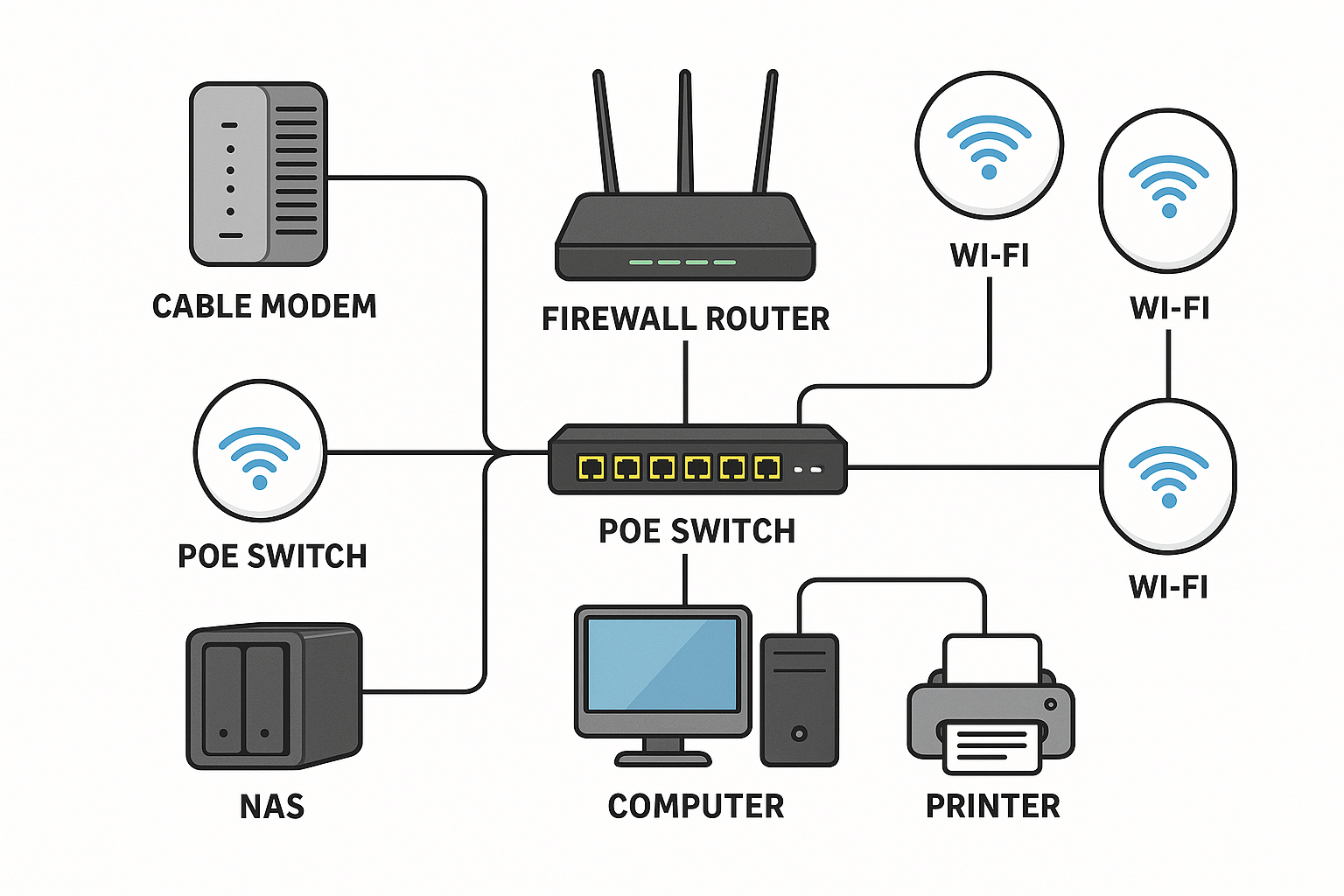
One of the first things you need to consider when starting on your home automation project is the strength of your home network. The home network is the backbone for all your devices and if you have not established an efficient network, your home setup is unlikely to succeed.

Don't Do What I Did

Take if from me, I know. I started about 10 years ago with the purchase of a Nest smart thermostat. Around the same time, I added our first (of 5) Alexa Echo device as a voice assistant. I didn't really give much thought to either security or bandwidth and I just added both devices to the 2.4ghz WiFi, along with all of our other traffic. We actually did not have that much traffic back then - perhaps 4 iPhones, an iPad, and a laptop or two.

Things have changed since then. A lot!

We now have over 40 connected devices including the Alexa devices, Google Nest thermostat, and a plethora of switches, cameras, smart plugs, a kitchen range, and two TVs. We still have three iPhones, an iPad, and three laptops that also run off the network. And things worked for the most part. The Google Nest thermostat (gen 3) worked well with Alexa after setting up the skill. It may have become disconnected over time but it was a simple fix to reset it. In hindsight, I would never buy Google again. First, it has it's own ecosystem. Second, despite trying not to be evil, Google makes decisions based on what is good for Google and their recent abandonment of Nest gen 1 and 2 thermostats left many people out in the cold. Or stuck in the heat, dependingon where they live.

I had not given much choice to the devices that I purchased and was happy if they worked with Alexa. Most do. That creates another problem - disorganization and multiple entries in Alexa for the same device. That became a mess. I found that using Alexa was a mess in general.

So I did what many people do once they learn more, they standardize on one particular tech hub. It could be Alexa, but since I am a fan of Apple, I chose Apple. Which is when I learned that Apple is more network dependent than any of the other hubs. (I will have a separate post later on why I like Apple).

Apple Home Loves a Strong Network

That headline could also read, Apple Home Won't Work on an Average or subpar Network. At least not consistently. When I first started down the Apple road, I immediately began experiencing issues. At first I didn't recognize these as network issues.

It started when I noticed a light on in the living room that should not be on in the morning. It should have been off. There were others in this state as well. I checked the app and was unable to shut them off. They just showed as Not Responding.

I googled it and every instruction started with reboot the router, and reboot your homepod. Every one without fail. I did both of those and nothing - same condition. They I had to go in an re-add all my devices to the Apple Home. That did the trick. At least temporarily. But not for all cases.

I could not get my Logitech Circle doorbell cam to work. And the lights on the outside of the garage never came back. After reviewing the placement of my WiFi access points, I realized that I probably had weak or non-existant coverage to those points. That said, it used to just work with similar WiFi light bulbs in those locations!

Prior to moving to Apple Home, I was using the SmartLife app and Alexa and things had worked great. With Apple Home, not so much. Ugh, now what?

Redesign from the Ground Up

That is when I decided to revise the network from the ground up. After all, the old network had evolved over time and served our needs well. But I had routers and access points that were well over 10 years. It was time to invest in some new gear and bring the network up to date. I also wanted to create separation for all those Internet of Things (IoT) devices to keep them away from our personal devices. This was for both security and performance reasons.

In my next blog post, I will outline the process I followed. There was a lot of trial and error and my hope is that you can avoid some of the errors I made in designing your own network setup.
Key Benefits of Smart Home Automation

Understanding Smart Home Automation

Smart home automation is a popular trend because of the many benefits it provides. Experts estimate that the adoption of Smart Home devices and tools will grow by 23% from 2025 to 2032. And no wonder, given the proliferation of devices and the ease of adoption.

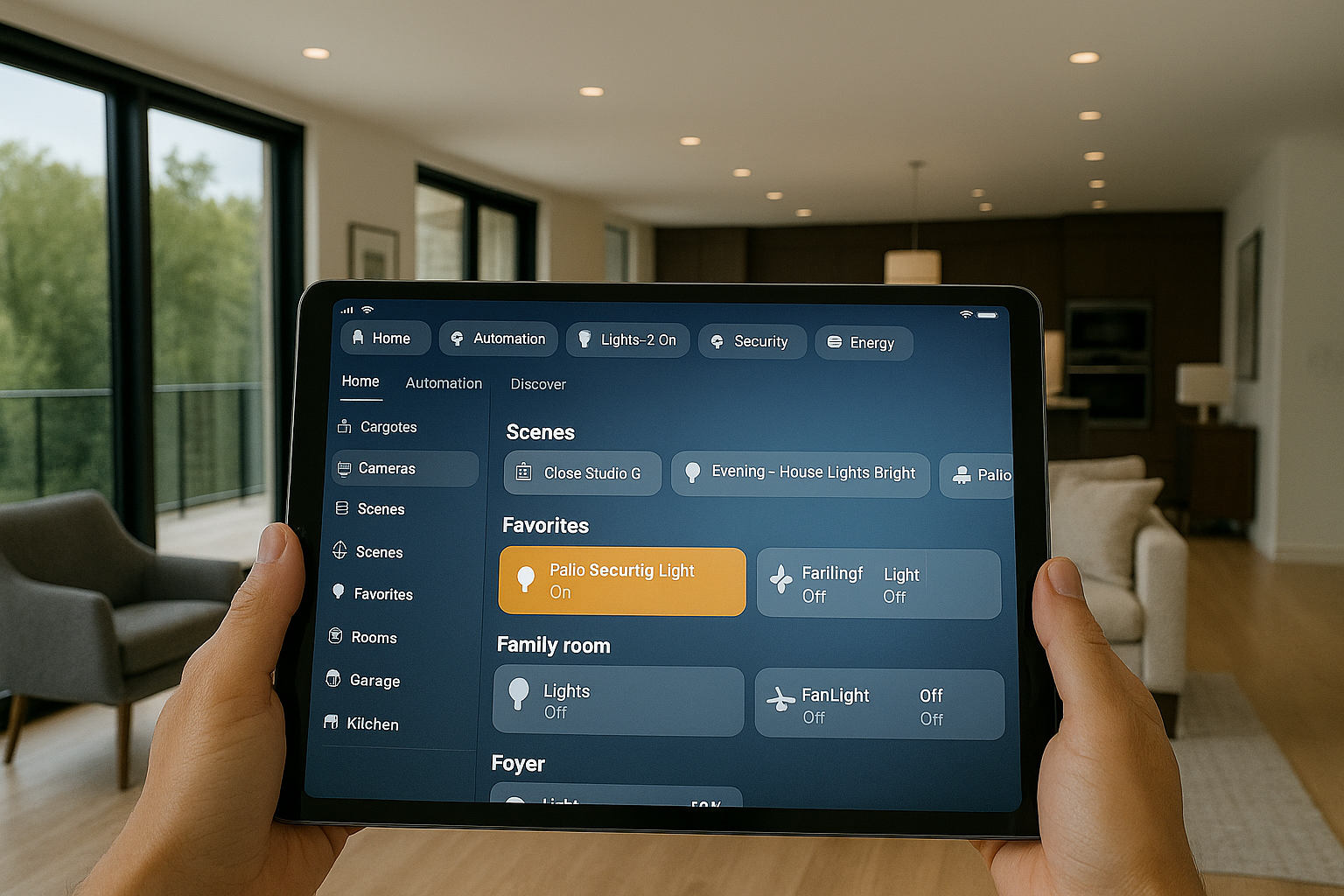
Most homeowners already hold the key to their smart home in their hands. With an average smartphone, users can control their entire home environment using the touchscreen or even voice commands. Key benefits include comfort, security, convenience, and energy savings as outlined below.

Comfort

Smart Home automations can make your home warm and comfortable by controlling the environment. This includes setting your desired tempurature, adjusting the lighting and window treatments, and controlling ceiling fans. You can even establish a collection of settings called 'scenes" that automatically adjust your home for morning, daytime and evening.

Most smart home tools will also permit you to use the location of your phone to determine whether the heat should be turned up or down, or the entrance light should be turned on as you arrive.

Homeowners can set up automations and shortcuts that allow them to use a one-word command such as "bedtime" to shut off all the lights, lock the front door, close the garage door, and set the thermostat for sleep temperatures.

Security

Security is an area where smart homes really shine. You can set up your doorbell camera to alert you when someone is at your door, even when you are miles away or on vacation. You can open your front door using only your phone or watch, or provide a temporary code so that a family member may open the door with their phone.

You can glance at your phone to determine if someone left the garage door open or set up a routine to ensure it is automatically closed after a certain period of time, or in the evening as part of a bedtime routine. 

You can also use cameras to monitor your home whether you are home or vacationing in Cancun. Doorbell cameras are one of the most common devices though many owners add additional cameras for their backyards or back doors.

Security also extends to door and window sensors which can tell you if a door is ajar or fully open, smoke and gas detectors that warn of potential problems, and water leak detectors which can be added to basements and laundry rooms to provide an early alert of any water before there is damage.

Convenience

Simplify and automate your everyday tasks with easy to establish automated routines. These can be as simple as turning on the houselights every day at sunset, or turning on the porchlight if movement is detected in the evening. You could also turn on the landscape lights every evening at sunset, or turn off the porchlight at sunrise.

You can also make more complex routines based on whether you are at home or not. In "away" mode, lights can be adjusted automatically based to make it less obvious that you are away. You can also set your front door to unlock, entry lights to come on, or garage door to open as you arrive home, based on the location of your phone. 

You can also monitor and control your home from anywhere.

Energy Savings

Last but not least, you can save on heating and cooling, water heating, and electricy by ensuring devices are turned down or off when you don't need them. Already at the airport on your way out of town? Adjust those settings directly from your phone.

You can also use energy tracking plugs to determine the energy usage, helping you to pinpoint areas of potential energy savings.

And More to Come

Most people don't take advantage of the existing technology to get the benefits I have described above. Not surprisingly, there are more to come as manufacturers make more and more appliances and devices "smart". Samsung is already making refrigerators that monitor the contents and include Artificial Intelligence (AI) to recommend shopping lists or warn you that your are nearly out of milk. Washers and dryers can send an alert to your phone from the laundry room to let you know that they finished their cycle. Ranges can be controlled to preheat remotely using your smartphone. And the potential is there for much more.

Questions about how smart home automation may help you? Please use our contact page to schedule a free consultation.